A lot of sites now use OpenID. This is great, as you can use the one account on multiple sites. Unfortunately, Facebook accounts can not yet be used as OpenIDs 😦. However, using Facebook logins isn't too hard, as they support using OAuth 2.0. OpenID and OAuth are fundamentally for different things (OpenID is authentication, OAuth is authorization), but it still works well in this situation.
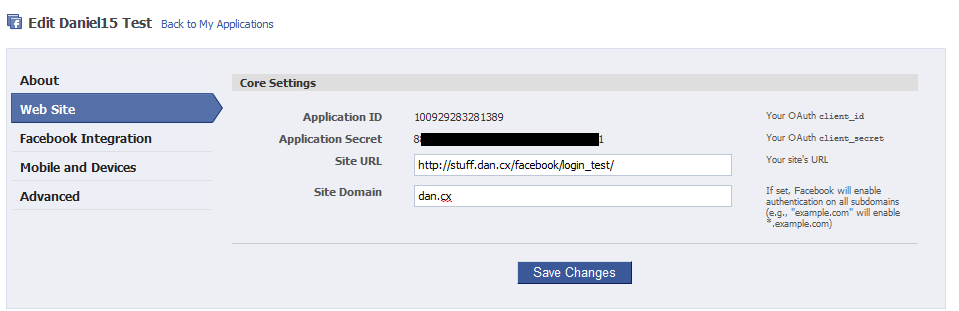
Firstly, sign up for a Facebook application at the Facebook developer website. You'll have to correctly set the site URL and site domain. Copy the application ID and application secret as shown on the Web Site section of the settings, as you will need them later.
Now we're ready to begin. Here's a very simple class for logging in via Facebook. It doesn't have much error checking, but should work okay: Download the class (Facebook.php). Here's some code that uses that class:
$facebook = new FacebookLogin('100929283281389', '8*******************************1');
$user = $facebook->doLogin();
echo 'User\'s URL: ', $user->link, '<br />';
echo 'User\'s name: ', $user->name, '<br />';
echo 'Full details:<br /><pre>', print_r($user, true), '</ pre>';
The first number in the constructor is the application ID, and the second one is the application secret (remember these from earlier? Here's where you use them!). Stick both the class and the little code snippet above into a .php file, and access it. If everything works correctly, you'll be able to hit that file to log in via Facebook, and get the user's details after logging in. Here's a demo to show you how it works. The idea now is you save the file as something like "FacebookLogin.php", and add a "Log in using Facebook" link on your site that goes to it 😃.
The class I've provided here is just a base class that you can base your own code on. What you do now is up to you. Here's some suggestions:
- Move the application ID and secret into a config file, instead of hard-coded like above
- If you're using this to log in to a site, I'd store some of the user's details (like name, URL and Facebook ID) in session variables.
- Maybe do things like load the user's profile picture. The access token retrieved at this line: $this->access_token = $result_array['access_token']; can be used to access pretty much anything on Facebook, as long as the user has given permission. Take a look at the demo to see what info you can get by default
Good luck! 😃

Comments
The link http://stuff.dan.cx/faceboo... doesn't seem to work
Sorry about that, the correct URL is http://stuff.dan.cx/faceboo.... I'll update the post :)
Hy facebook dont return user email ?
It's a permission you need to use - See the Facebook documentation at http://developers.facebook.... (it's the "email" permission).
Hello Dan,
I want to auto login on facebook from my site i have put username and password into database of facebook account when user click on facebook button then he will redirect on facebook .
Give me suggition..................
You cannot log in with a Facebook username and password. You MUST use OAuth for logins.
I have to try this out some time. Was looking for a way not to login to like 10 different accounts separately(mail,blog,etc) but with a single login. No I don't want to use roboforms or store my password through browser. I used Google and Facebook too often so it's either of the 2. Or maybe openID? What would you recommend? Thanks! :D
If you use Facebook a lot, it might be a good idea to use Facebook to log in to all your sites. Just be careful to keep your password secure! Between Google and Facebook, I'd choose Google. I personally like OpenID the best, though. :)
Hi ALL,
I want to use facebook login in my .Net website.
Like i will login with facebook credentials in my website and can do anything throughout application.
Please suggest...
Thanks
Anshu
You could try write some similar code for .NET. But there's a Facebook API implementation for .NET that might help you. Take a look at http://facebooksdk.codeplex... :)
I want email id too from user but I am not sure how to edit your existing code. Can you please let me know what needs to be changed for getting email id access?
You need to request the "email" permission. See https://developers.facebook...
In my code, you'd find this bit:
$data = array(
'client_id' => $this->client_id,
'redirect_uri' => $this->my_url,
'type' => 'web_server',
And add this under it:
'scope' => 'email',
Thanks a lot, your code is the best!!!!
i want logout code please help me
That's a greate code. Very fine!
Hi Daniel15, thanks for a great intro to the topic.
I'm not able to reproduce your results. I have my index.php with 5 lines, and the class in separate facebook.php, and it throws error:
{
"error": {
"message": "Invalid redirect_uri: Given URL is not allowed by the Application configuration.",
"type": "OAuthException",
"code": 191
}
}
I combed the facebook.php for redirect_uri, and can only find this:
$this->my_url = 'http://' . $_SERVER['SERVER_NAME'] . $_SERVER['PHP_SELF'];
but to my understanding, the PHP will provide the url dynamically, wherever the server is located. Could it be that my facebook app settings do not match, and thus throws the error?
I feel reeeaally new. Thanks for your hard work and time! :)
Hi Mr Daniel,am getting this exception,could u help pls..
Fatal error: Uncaught exception 'Exception' with message 'Invalid response received from Facebook. Response = ""' in C:\xampp\htdocs\FecaebookLogin-24-07-12\FacebookLogin.php:71 Stack trace: #0 C:\xampp\htdocs\FecaebookLogin-24-07-12\FacebookLogin.php(35): FacebookLogin->verifyLogin() #1 C:\xampp\htdocs\FecaebookLogin-24-07-12\Login.php(7): FacebookLogin->doLogin() #2 {main} thrown in C:\xampp\htdocs\FecaebookLogin-24-07-12\FacebookLogin.php on line 71
Awesome code, clean, simple. Thank you very much for sharing.
I post this in case I am not the only idiot here, if in testing this it fails, if yo tell facebook your site is domain.com, and you are at www.domain.com, it will *not* work. You get all sorts of uglies on your screen.
Use a simple .htaccess file to fix it to www or not, as you prefer, and TELL FACEBOOK!!!
This is a great .htaccess file with documentation:
http://www.htaccessbasics.c...
Thanks again for this nice code - I truly appreciate it
"error": {
"message": "Invalid redirect_uri: Given URL is not allowed by the Application configuration.",
"type": "OAuthException",
"code": 191
this error is coming when i click on fb login link, can u tell me for which this the error is coming.
You need to make sure your script is running on the same domain as the URL you entered on Facebook.
Hi Daniel,
this information is really amazing and everything works great!
Many thanks and keep up the great work!
Wayto go,
Eric
No worries, glad it helped! :)
Hi Daniel15
I want to fetch fecebook album & display it on my site. kindly help !
[11-Sep-2012 12:11:11 UTC] PHP Fatal error: Uncaught exception 'Exception' with message 'Invalid response received from Facebook. Response = ""' in xxxxxxx\FaceBookLogin.php:69
Stack trace:
#0 xxxxxxx\FaceBookLogin.php(33): FacebookLogin->verifyLogin()
#1 xxxxxxx\FaceBookLogin.php(87): FacebookLogin->doLogin()
#2 {main}
thrown in D:\wwwroot\LocalUser\roda71.nl\www\FaceBookLogin.php on line 69
Seem to have a identical problem as Sri,
What could be causing this? App not fully registered at FB? There's quite a lot to fill in, although I have an ID and secret.
That's a very odd issue... For some reason, Facebook is returning an empty response. Are you sure the domain you're running the script on is the same as the domain you entered while creating your Facebook app?
Hello daniel,
Thanx for such a good post. I have used facebook login my website guppr.com. Now i want to post feeds on user's timeline. How can i do that... Should i use a complete new code or if is it possible to extend this code then how?
Thanks in anticipation...
guppr.com
Well, with my code, you obtain an access token. You can use this token to access anything in Facebook's Graph API, including posting on their timeline. You just need to request the correct permissions to begin with. Take a look at Facebook's documentation for more info.
Hello everyone,
I'm so interested in one issue, when i insert user in my database, with username, if he/she (i mean user) write her/him username in login panel (on my web site login form), what he/she write in password panel? because facebook app don't give me user password if she/he never use this information width my website? (i mean username)
You wouldn't store a password. You'd just show a Facebook login link. After the user logs in with Facebook, you'd look up their Facebook user ID in your database to see if they already have an account in your system.
Thank you for your answer, i understood that user can't log in width Facebook username in my web site without Facebook logs, in spite of the user is my database, because he/she have no password on my site
Yeah, if a user logs in with Facebook, they would need to log in with Facebook every time they log in to your site. You would only store the Facebook user ID in your database.
Nice. This is the simplest I found in my quick search for a php based solution. Thanks!
No worries, glad it helped! :)
A little confused and sure I'm missing something silly. I have the code in place and all working as expected based on what I'm thinking here...but the application ID and application secret come off my developer page, right? So the user infor returned are my own data. How do I let someone besides me login via this mechanism?
The application ID and secret identify the application, not any one user. They tell Facebook that it's your application using the API, and are not tied to any user in any way.
An error occurred. Please try again later.
HI, i got an error like 'An error occurred. Please try again later.'.plz give me suggessions as early as possible
Is that error on your end, or on Facebook's end (what is the domain in your browser when the error occurs)? If it's on Facebook's end and you're logged in as an administrator of your application, it should give you more information about what went wrong.
hey daniel the code works very fine, i only have one query, in comment below 'Ashish' said that he wants the user email too and then you told him to add scope to the code. but i havent added any scope in code but still i am getting the user email, can you explain me why ? and thanx a lot for the code.
Maybe the user that is logging in has their email address set to public on Facebook. Potentially you only need to add the scope to get user email addresses when they're private (not publicly displayed on their profile).
how can i make others to log-in on my site using facebook...the method shown above gives me a way to authenticate myself..
Once you set up the page, anyone should be able to hit the login URL to log in.
הקוד עובד נהדר!
אבל הוא לא מדפיס לי את הנתונים של המשתמש - כלום נתונים
מה לעשות?
נ.ב. גם שאני מתחבר, הוא לא מבקש לאשר מידע לאפליקצייה.
תודה.
This translation of the previous message:
--------------------------------------------------------
The code works great!
But he did not print my user data - nothing data
What to do?
PS I connect well, he did not wish to confirm application.
Thank you.
What about my existing website members ? I'm looking for how to integrate Facebook logins that will sync to existing members accounts any ideas please.
Depends on how your existing members authenticate. Ideally you'd let them log in with their existing account, and then let them "attach" a Facebook account to their existing account.
Hi Admin , Very Nice programming , its really helpful for me a lot, i just follow your instruction and find that code run very nicely , please help me out to solve my problem that is , i want to get the profile Picture of user also please suggest me how can i do this stuff, thanks again for such a nice short code. Inspire Technology
Hi Admin , Very Nice programming , its really helpful for me a lot, i just follow your instruction and find that code run very nicely , please help me out to solve my problem that is , i want to get the profile Picture of user also please suggest me how can i do this stuff, thanks again for such a nice short code. Inspire Technology
Look in the user details outputted in the "full details", it should include the picture. If not, check the Facebook API which should have an API method to get the picture.
In my site I got the error such as
Fatal error: Uncaught exception 'Exception' with message 'Invalid response received from Facebook. Response = ""' in /home/a1191601/public_html/facebook/facebookLogin.php:70 Stack trace: #0 /home/a1191601/public_html/facebook/facebookLogin.php(33): FacebookLogin->verifyLogin() #1 /home/a1191601/public_html/facebook/index.php(4): FacebookLogin->doLogin() #2 {main} thrown in/home/a1191601/public_html/facebook/facebookLogin.php on line 70
I'm unable to solve it please help.
scope=email0not connected
how to get rid of this type of error while connecting to facebook app
Internal Server Error
The server encountered an internal error or misconfiguration and was unable to complete your request.
Please contact the server administrator to inform of the time the error occurred and of anything you might have done that may have caused the error.
More information about this error may be available in the server error log.
Please Any suggestion
I am create two pages First index with this code
: $facebook = new FacebookLogin('100929283281389', '8*******************************1');
$user = $facebook->doLogin();
echo 'User\'s URL: ', $user->link, '
';
echo 'User\'s name: ', $user->name, '
';
echo 'Full details:
Check your error log and see what the actual error message is.